
You can delete duplicate or unnecessary subscriptions in the Redox dashboard. Learn more about subscriptions.
- A user must be assigned to an engineer role to manage connections (i.e., create or delete subscriptions). Learn about user roles.
- Log in to either a development or staging environment. The self-service option is disabled for production environments.
- Log in to the dashboard.
- From the navigation menu, click the Connections page.
- Click either the Connected orgs or All subscriptions tab.
- From the Connected orgs tab:
- Click the connection tile with the subscription you want to remove.
- Click the Settings link of the subscription you want to delete.
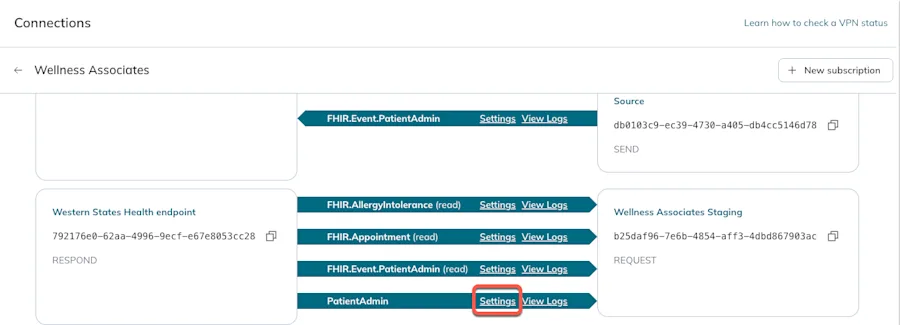
Subscription settings link
- From the All subscriptions tab:
- Click the subscription link of the subscription you want to remove.
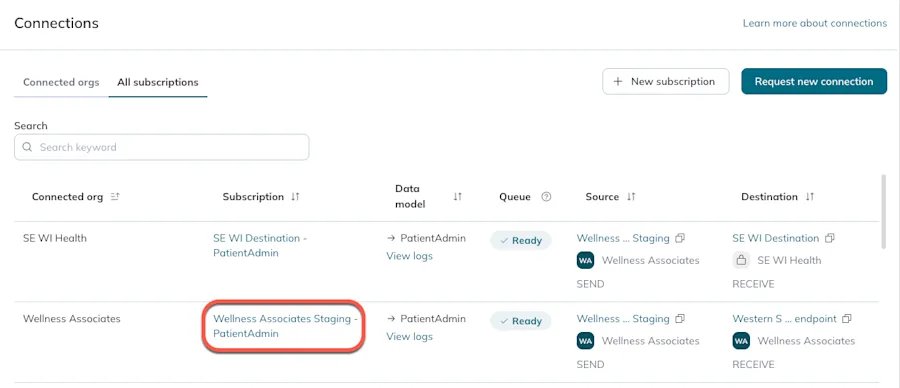
Subscription name link
- The Details page opens. Click the Delete button at the top right corner.Disabled Delete button
- A confirmation modal opens. Click the Delete button to proceed or the Cancel button to keep the subscription.

Delete a subscription
