
During implementation or any other kind of testing, you can simulate sending messages from your system. The test messages go to a mock EHR system, but you can review resulting logs on the Logs page.
Rate limit for DevTools
These instructions assume that you’ve already created at least one API key in your development environment. If you haven’t yet, create and authenticate an OAuth API key.
- Log in to the Redox dashboard.
- From the Environments drop-down on the left-hand menu, select your development environment.
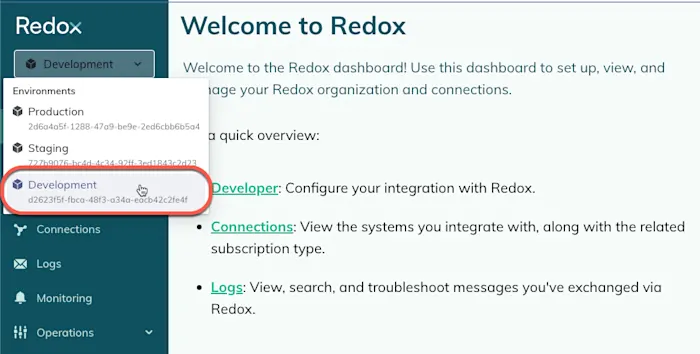
Select your development environment - From the navigation menu, click the Developer page.
- By default, the Sources tab opens.
- If you use our recommended OAuth API keys, find the OAuth API key you plan to use to authenticate your messages. Click the Edit button next to it.
- If you use legacy API keys, find the source associated with the legacy API key and click the Edit button next to it.
- The Settings page opens. Click the DevTools (Postman) tab. This tab contains download links to set up test messages in Postman. Check out Postman.
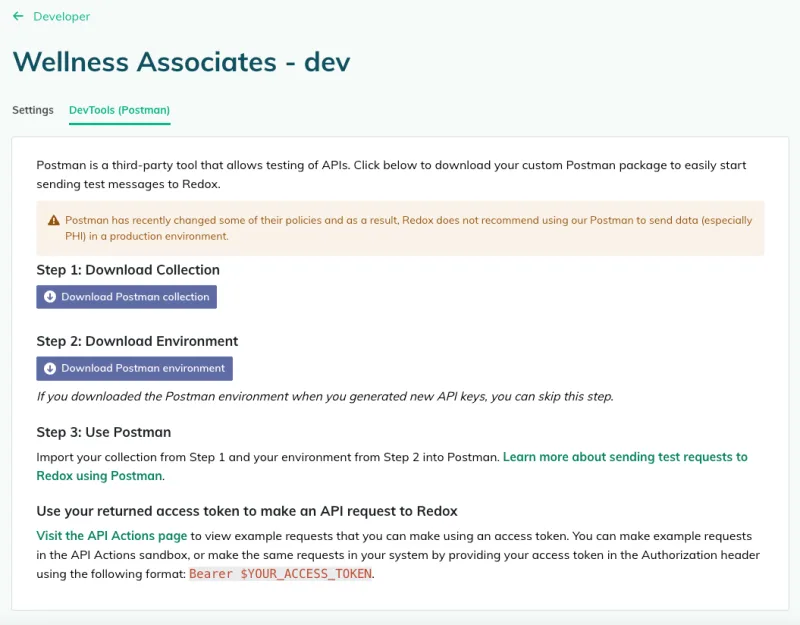
Available Postman downloads Developer downloadsDevTools for sources - Send test messages for your subscription.
- Check your logs by navigating to the Logs page. Learn how to search for logs.
- (Optional) Now that you’ve confirmed you can successfully send, you can test that your destinations receive, too. Test your destination.
Bonus articles to explore